Blog / Stop wasted ad spend
Amazon ads spending but no sales? Check these five things before you change a bid
"In just 3 days we spent almost 3000 rupees but zero sales." If that sentence could be yours, don't touch your bids yet.
Updated 2026-11-14
The short answer
First decide whether you have a traffic problem or a sales problem. Low impressions or clicks mean bids, relevance or your main image. Plenty of clicks and no orders mean the listing, price, reviews or the wrong search terms. Check impressions, CTR, CPC and conversion rate in that order, then read the search term report.
Traffic problem or sales problem?
“In just 3 days we spent almost 3000 rupees but zero sales”
Amazon Seller Forums (amazon.in), thread eef426f5, ~2024
Most sellers in this spot do one of two things. They raise bids to get more traffic, or they switch the campaign off. Both are guesses. In a similar amazon.in thread (~2025), where a seller's search terms looked relevant but brought no orders, Amazon's moderator gave the right first step: "identify if the issue is traffic or sales".
The two problems have different fixes, and the fix for one makes the other worse. More traffic to a listing that doesn't convert just spends faster. If a term like CTR or CVR is new to you, the metric glossary explains each one in a line.
| What you see | What it usually means | Where to look |
|---|---|---|
| Few impressions | Bids too low for the auction, or targeting too narrow | Bids vs suggested range, keyword list |
| Impressions but few clicks (low CTR) | Shoppers see you and pick someone else | Main image, price and review count next to rivals in the results |
| Clicks but no orders | The listing, price or search term is wrong for the shopper | Detail page, price, reviews, search term report |
The five checks, in order
- Enough data. Three days and a few thousand rupees (₹3,000 is about $32) is an early read, not a verdict. Amazon reports a day's results about a day late, and an order can be credited days after the click. Look at 14 days before you judge a campaign.
- Impressions. Open the campaign, sort ad groups and keywords by impressions. If most keywords show almost none, your bids are under what the auction needs, or the keywords are too narrow. That is a traffic problem.
- CTR. Divide clicks by impressions. If it's well under your other campaigns, search your main keyword on Amazon as a shopper would and look at your result next to the others. Image, price and the star count do most of the work here, and no bid change fixes them.
- CPC. Compare what you pay per click with what you can afford. A ₹999 (about $10.57) product converting at 10% with a 25% target ACoS can afford about ₹25 a click. Our guide on why suggested bids keep rising walks through that formula.
- Conversion rate. Orders divided by clicks. If clicks are healthy and orders are zero, the problem sits on the detail page or in the searches you are paying for. Go to the search term report next.
“those tools just spend your budget faster if the listing isnt dialed in”
r/FulfillmentByAmazon, ~2025-04
That commenter is right, and it applies to manual bidding too. If the listing is the problem, fix the title, images, price or reviews first. Ads only send shoppers to the page; they can't make the page convince them.
Read the search term report before you blame the listing
Sometimes the listing is fine and you are paying for the wrong shoppers. A wall sticker showing up for "wallpaper roll 10 metre" will get clicks and no orders. The search term report shows the exact searches that triggered your ads.
- In the Amazon Ads console, open Reports, create a Sponsored Products search term report for the last 30 days, and download it.
- Sort by spend, highest first. Filter to rows with zero orders.
- Read each search. Is it something your product actually is? Wrong size, wrong material, a competitor brand or a different product type are the usual offenders.
- Mark terms that are irrelevant and have taken more clicks than you'd normally need for an order. If you convert at 10%, that's one order per 10 clicks, so 20 clicks with nothing is a fair line.
- Add those as negative exact keywords in the campaign or ad group they came from.
The full method, with thresholds by conversion rate and when to use negative phrase instead, is in how to find and block search terms that waste budget.
How CreatAiGenie runs the same checks
Doing this by hand once is useful. Doing it every week across every campaign is where it falls apart. CreatAiGenie checks keywords, targets, search terms, bids, budgets, ASINs, placements and hours every day, and lists what to fix on the Suggestions page. Each line shows why it was flagged, the exact change, and what it cost you, measured from your own last 30 days.
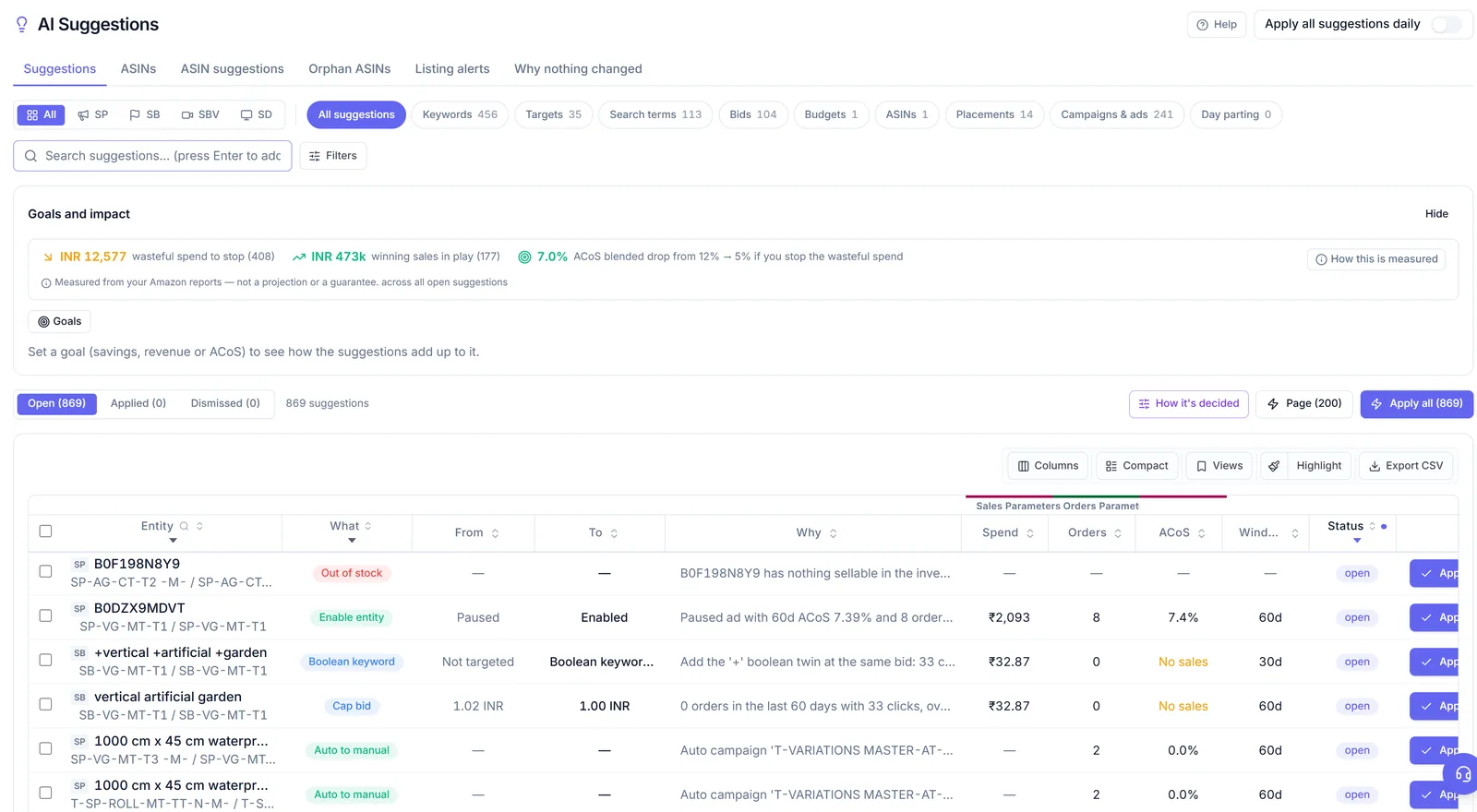
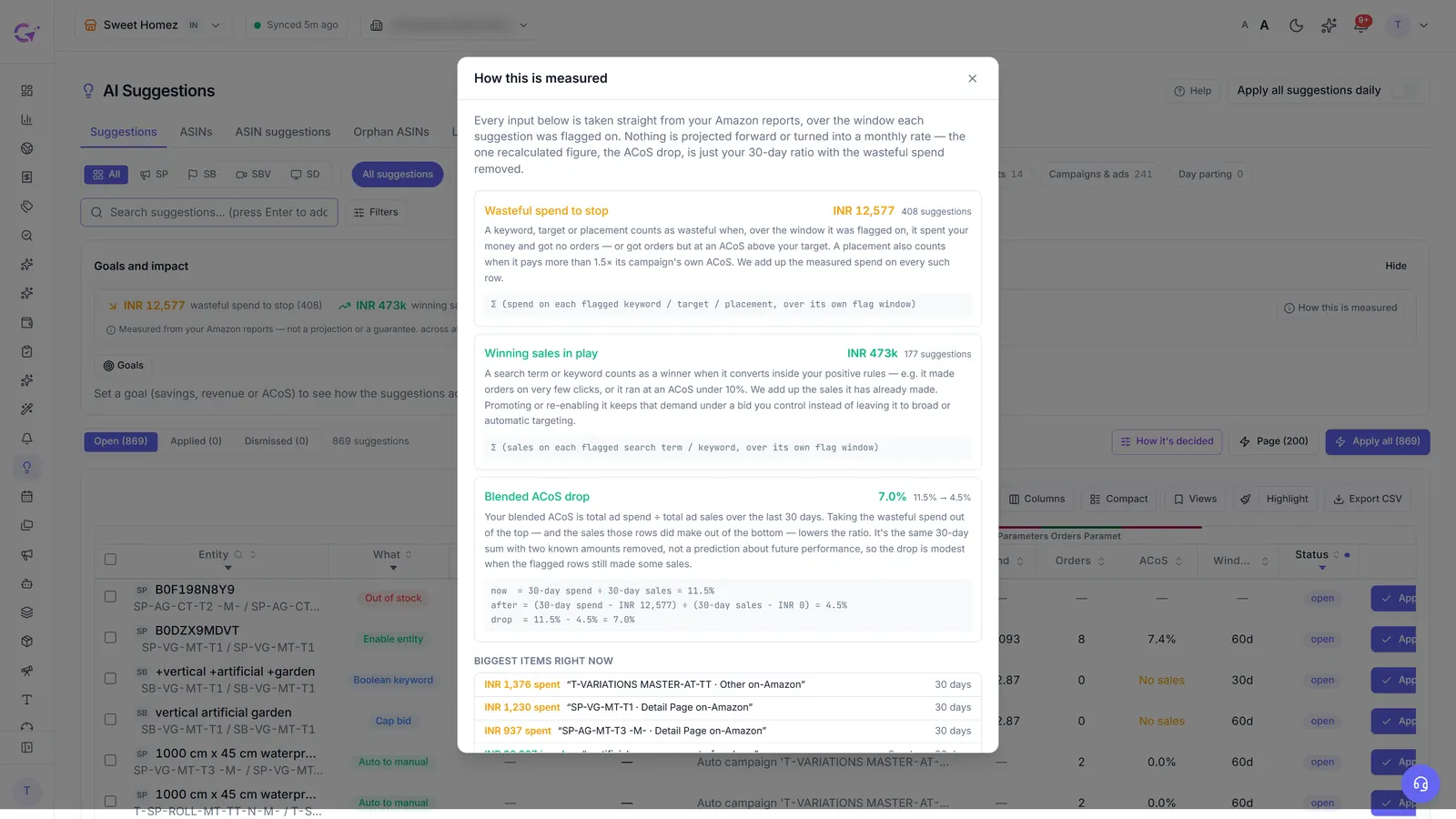
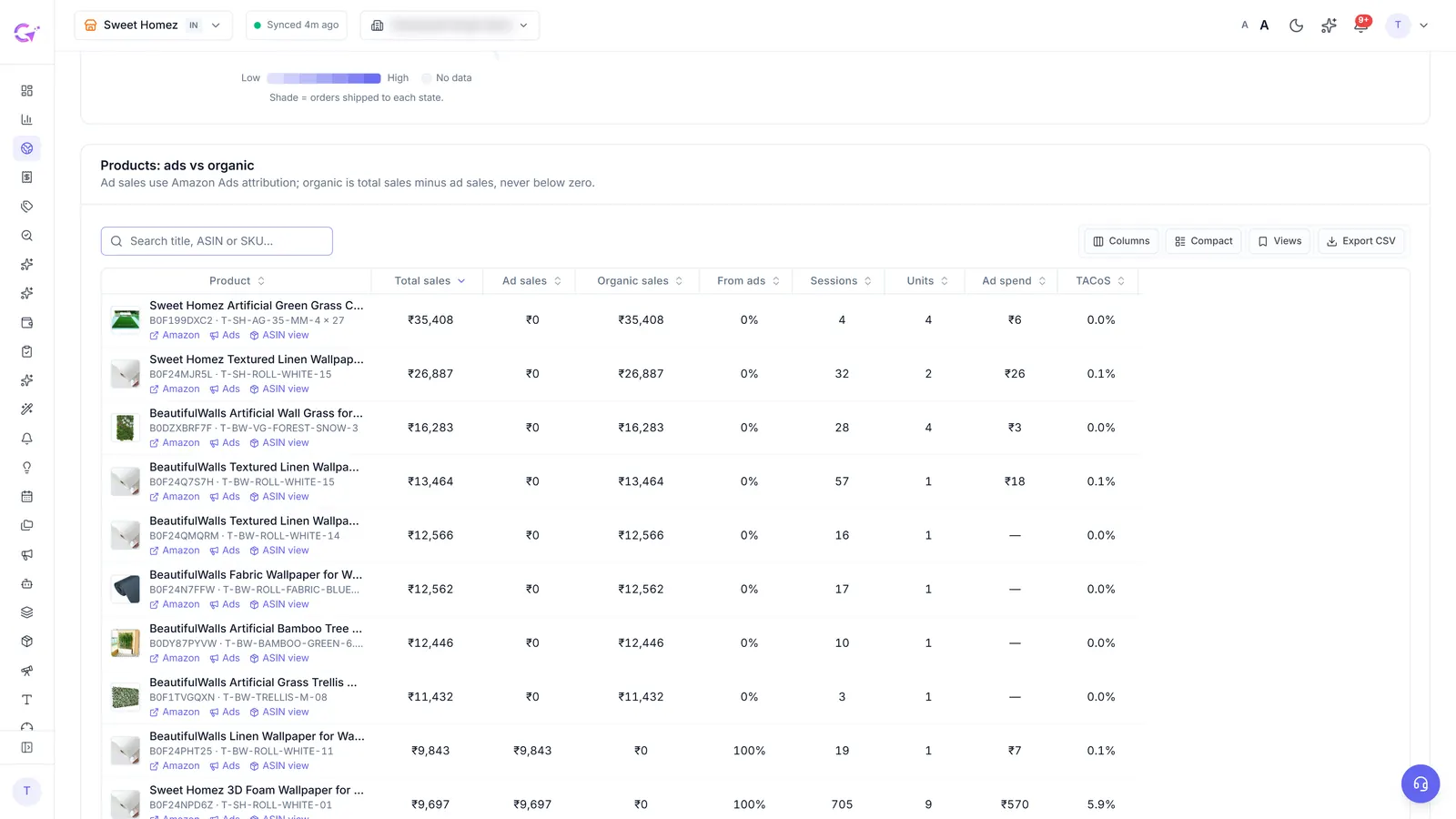
Search terms with clicks and no orders show up as negative keyword suggestions, and you can block them in bulk from Search Terms. If you connect Seller Central (Platinum, and included in the trial), Business 360 adds the sales side: total sales, organic sales and sessions per product next to ad sales, which tells you whether a product converts for anyone or only fails through ads.
What to do today
Pull 14 days of data, run the five checks, and write down which side the problem is on before you change anything. If it's traffic, adjust bids and targeting. If it's sales, fix the page or block the irrelevant searches.
A quick example of how the decision plays out. Say a campaign took 60 clicks in two weeks and sold nothing. If those clicks came from searches that describe your product exactly, the shoppers were the right ones and the page lost them: look at your price against the first page of results, your review count, and whether your main image shows the product clearly at thumbnail size. If most of the clicks came from three or four unrelated searches, the page never had a fair chance. Block those searches, leave the bids alone, and look again in a week.
Write down what you changed and the date. A week later you want to know whether the fix worked, and memory is a poor record when you've touched five campaigns.
For the CPC check, the ACoS calculator gives you the numbers in a minute. If you try CreatAiGenie, the Suggestions guide explains each suggestion type and what it changes.
Questions people ask
How long should I wait before judging an Amazon ad campaign?
Give it about 14 days. Amazon reports results about a day late and credits some orders days after the click, so a 3-day read often looks worse than the campaign really is.
Should I raise my bids if I get clicks but no sales?
No. Clicks with no orders is a sales problem. More traffic to the same page spends faster without fixing it. Check the listing, price, reviews and the search terms first.
How many clicks without an order before I block a search term?
Use your own conversion rate. At 10%, you'd expect an order about every 10 clicks, so an irrelevant term with 20 clicks and no orders is a fair candidate to negate.
Does CreatAiGenie change anything automatically?
Not unless you switch it on. Suggestions wait for you to apply them, "Apply all suggestions daily" is off by default, and every applied change can be rolled back from the Change Log.
Check it in your own account
See pricing · Get a free PPC audit · Start a 14-day free trial