Blog / Bids and profit
Amazon's suggested bids keep rising. Here's how to set bids from your own numbers
"my old SKU's suggested bid suddenly skyrocketed". Same product, same listing, and Amazon now says it needs a much bigger bid.
Updated 2026-11-12
The short answer
A suggested bid tells you what tends to win the auction, not what your product can afford. Work out your own ceiling instead: max CPC = price x conversion rate x target ACoS. A ₹999 product converting at 10% with a 25% target can pay about ₹25 a click. Bid at or under that, whatever Amazon suggests.
Why suggested bids and CPCs keep going up
“my old SKU's suggested bid suddenly skyrocketed”
Amazon Seller Forums (amazon.in), thread f04ca8ff, ~2023
“I have also seen CPC increase dramatically”
Amazon Seller Forums (amazon.in), reply in thread f04ca8ff, ~2023
Amazon describes its suggested bid as an estimate based on recent winning bids for similar ads. So it rises when other sellers bid more on the same searches: a new competitor, a sale event, a category getting crowded. It says nothing about your margin. Two sellers with very different costs get the same suggestion.
Sellers have noticed. Forum threads from India, the UK and the US call suggested and default bids inflated, and one US Seller Central thread (~2025) puts high default and suggested bids on its list of console settings that work against sellers. You don't have to agree with that to see the point: the suggestion is Amazon's number, and the bill is yours. If your clicks already cost more than they return, Amazon ads spending but no sales covers the checks to run first.
Work out the most you can pay per click
Every order costs you the clicks it took to get it. If you know what an order is allowed to cost in ad spend, and how many clicks an order takes, you know your ceiling per click.
Max CPC = selling price x conversion rate x target ACoS.
| India example | US example | |
|---|---|---|
| Selling price | ₹999 | $25 |
| Conversion rate (orders / clicks) | 10% | 10% |
| Target ACoS | 25% | 30% |
| Max CPC | ₹999 x 0.10 x 0.25 = about ₹25 (about $0.26) | $25 x 0.10 x 0.30 = $0.75 (about ₹71) |
Use the conversion rate of the keyword or ad group if it has enough clicks, otherwise the product's. Rupee and dollar conversions at ₹94.48 to $1.
If Amazon suggests ₹40 and your ceiling is ₹25, bidding ₹40 means every order costs more than your target. Sometimes that is a fair trade for a launch or a ranking push. Make it a choice with an end date, not a default.
Your target ACoS should come from your margin, not a round number. How to find your break-even ACoS shows how to work it out after Amazon's fees, and the ACoS calculator does the arithmetic.
Console settings to check before you blame the auction
- Bidding strategy. Open each Sponsored Products campaign and check the strategy. "Dynamic bids - up and down" lets Amazon raise your bid above what you set when it thinks a sale is likely, so your real CPC can sit above your bid. "Dynamic bids - down only" or fixed bids keep you at or under it.
- Placement adjustments. A top-of-search percentage multiplies your bid on that placement. A 100% adjustment on a ₹25 bid is a ₹50 ceiling. Check the placement report before you keep it.
- Default bids. When you create a campaign, the default bid often starts from Amazon's suggestion. Look at the ad group default bid, and at keywords that have no bid of their own and inherit it.
- Keyword bids vs actual CPC. In the keyword report, compare your bid with the average CPC you paid. If CPC is close to the bid everywhere, you are paying your ceiling on most clicks.
- Then change bids in small steps, 10 to 20% at a time, and leave a few days between changes so the reports catch up. Changing the same bid twice in a day tells you nothing about either change.
When a keyword's ceiling sits well under what wins the auction, you have a few honest options. Move the spend to longer, more specific searches, where fewer sellers compete and shoppers convert better, which also raises the ceiling the formula gives you. Lower bids in the hours your shoppers browse but don't buy; which hours to cut bids on Amazon explains how to find them. Or improve the conversion rate itself, because every point of conversion raises the most you can pay per click.
What doesn't work is matching the suggestion everywhere and hoping volume makes up for it. If each order costs more than your margin, more orders only make the loss bigger.
Bidding to your target with AI Genie Smart Bids
Doing the formula for every keyword, every week, is the part nobody keeps up. AI Genie does it with Smart Bids: you set a target ACoS for the account, an ad type, a campaign or an ad group, and Genie proposes bid changes that move each keyword and target toward it in steps.
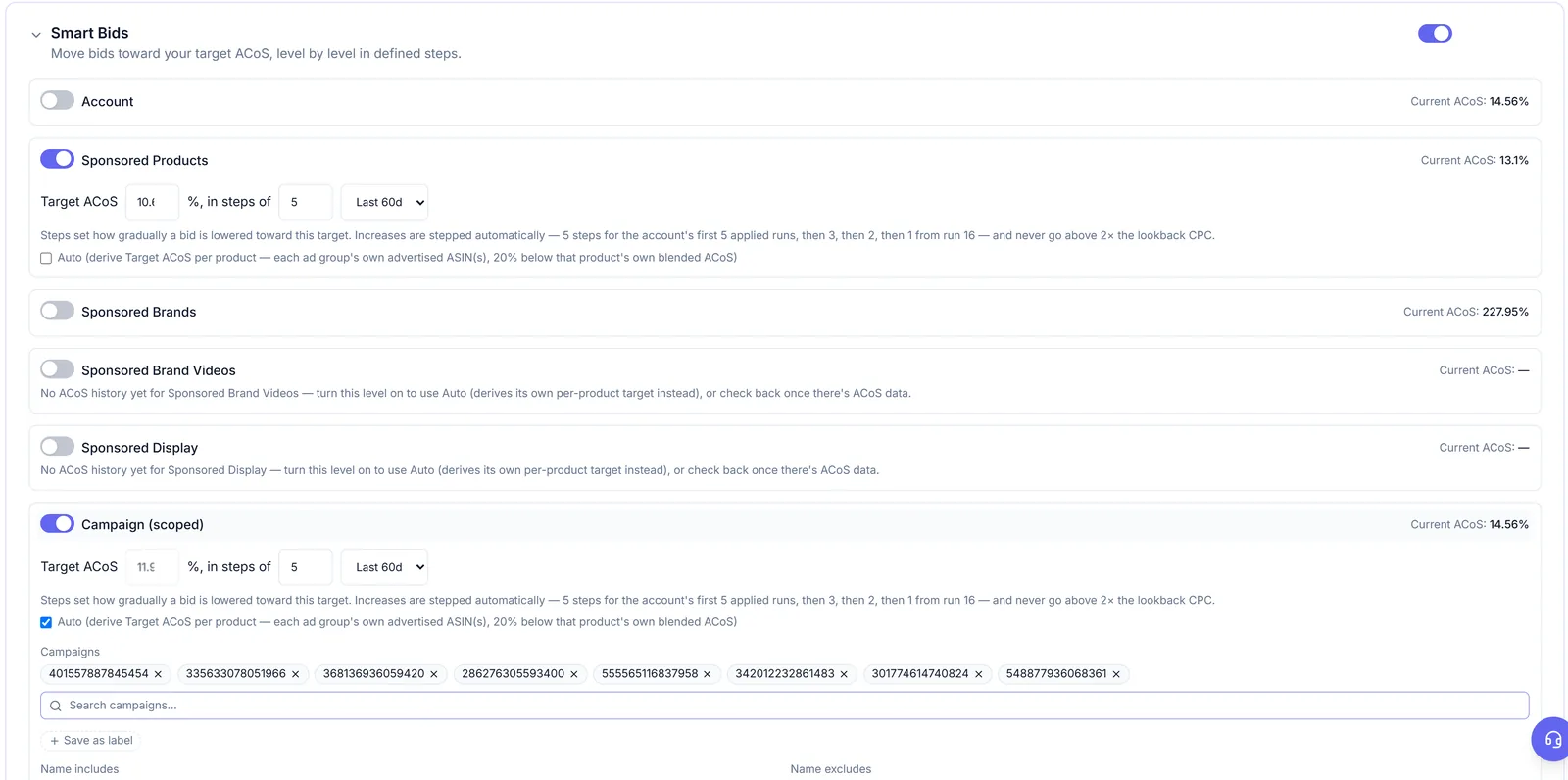
The limits are fixed, and they are the part that matters when CPCs are climbing:
- Bids never go below Amazon's marketplace minimum or above 2× what you pay per click today.
- Nothing is changed twice in 24 hours.
- Decreases are spread over the number of steps you set. Increases start spread over 5 steps for an account's first applied runs, then 3, 2 and 1 as history builds. An increase is cancelled if ACoS crosses your target.
- Dry run is on by default. Genie shows what it would change, and nothing reaches Amazon until you turn dry run off and apply.
Preview first, protect what matters, undo what you dislike

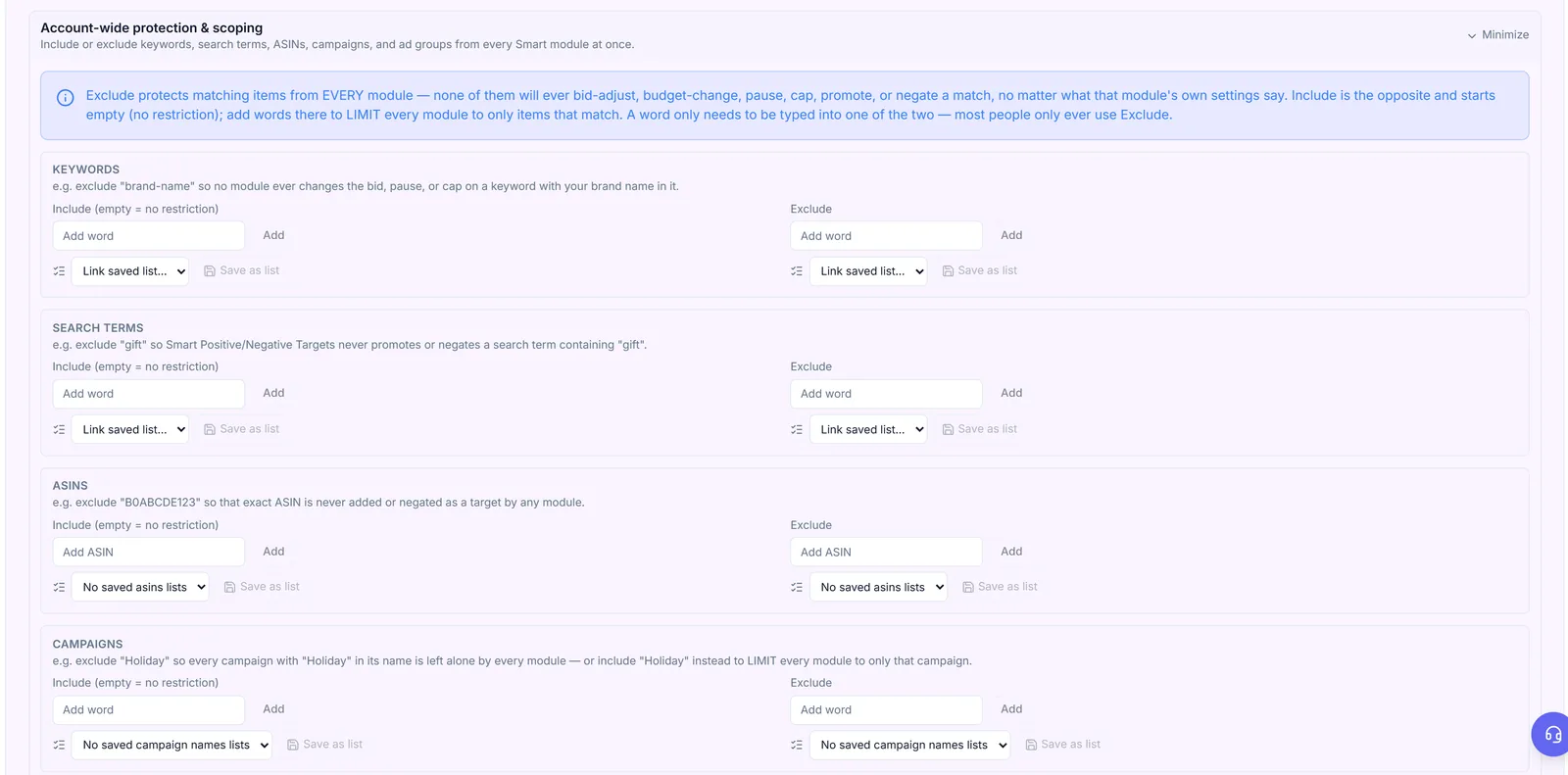
Every change is logged with the reason and a measured 7-day result, and you can undo it from the Change Log. The Smart Bids help article explains each setting, and dry run and safety covers previews.
Questions people ask
Should I bid Amazon's suggested bid?
Only if it is at or below the max CPC your price, conversion rate and target ACoS allow. The suggestion reflects what wins the auction, not what your product can afford.
Why is my CPC higher than my bid?
Usually placement adjustments or the "Dynamic bids - up and down" strategy, which both let Amazon go above your base bid. Check the campaign's bidding strategy and placement settings.
How fast should I lower bids that are too high?
In steps of 10 to 20%, a few days apart, so each change has time to show up in the reports. Big one-off cuts can drop a keyword out of the auction entirely.
Can AI Genie raise my bids a lot when CPCs spike?
No. Bids never go above 2× what you pay per click today, nothing is changed twice in 24 hours, and dry run is on until you switch it off.
Check it in your own account
See pricing · Get a free PPC audit · Start a 14-day free trial