Blog / Bids and profit
Break-even ACoS: how to set a target ACoS from your real profit
"All my porfits go to amazon advertising…" If that's how your month feels, the ACoS target was probably never tied to what one sale actually earns you.
Updated 2026-11-11
The short answer
Break-even ACoS is the share of a sale's price you can spend on ads before that sale loses money. Take the price, subtract Amazon's fees, cost of goods, a refund allowance and any tax inside the price, then divide what's left by the price. Your target ACoS is break-even minus the margin you want to keep.
What break-even ACoS tells you
ACoS is ad spend divided by the sales those ads brought in. A 30% ACoS means you paid ₹30 (about $0.32) in ads for every ₹100 of ad-driven sales. Whether 30% is fine depends on something the ads console never shows: how much of that ₹100 was yours to spend in the first place. If the terms are new, our metric glossary defines ACoS, TACoS and the rest.
“All my porfits go to amazon advertising…”
Amazon Seller Forums (amazon.in), thread f04ca8ff, ~2023
That thread is mostly about suggested bids and CPCs jumping (we cover that side in why Amazon's suggested bids keep rising). The feeling underneath it is common, though: ads look busy and the bank balance doesn't move. Break-even ACoS is the line where busy turns into losing money. Our free ACoS and break-even calculator does the sum in a minute, and the Amazon profit calculator shows what one unit really earns after fees.
Work it out by hand: a worked ₹ and $ example
Pick one product and use a recent month of real orders, not the price on the listing. Then go line by line:
- Start with the price the shopper paid, on the same basis as the sales figure in your ads report.
- Subtract the tax inside that price. In India the price includes GST; in the UK and EU it includes VAT. It was never your money.
- Subtract every Amazon fee on the sale: referral, closing, fulfilment (FBA or Easy Ship) and anything else on the order's line in the Payments transaction view in Seller Central.
- Subtract cost of goods: what one unit costs you landed, including inbound shipping and packaging.
- Subtract a refund allowance. Take your refund rate for the last three months and apply it to the price before tax.
- What's left is profit before ads. Divide it by the price from step 1. That's your break-even ACoS.
| Line | ₹ (amazon.in) | $ equivalent |
|---|---|---|
| Price the shopper paid | ₹1,180 | $12.49 |
| GST inside the price (18%) | −₹180 | −$1.91 |
| Amazon fees (referral, closing, fulfilment) | −₹230 | −$2.43 |
| Cost of goods | −₹320 | −$3.39 |
| Refund allowance (5% of ₹1,000) | −₹50 | −$0.53 |
| Profit before ads | ₹400 | $4.23 |
| Break-even ACoS (₹400 ÷ ₹1,180) | 33.9% | 33.9% |
Illustrative numbers, converted at ₹94.48 to the dollar. Use your own settlement data.
So this product can carry about ₹34 of ad spend for every ₹100 of ad sales before the sale stops making money. At a 40% ACoS it loses about ₹6 on every ₹100 of ad sales, and 40% looks perfectly ordinary on plenty of accounts. On a US listing, sales tax normally sits on top of the price rather than inside it, so the tax line drops out and the sum gets shorter.
From break-even to a target ACoS
Break-even is the ceiling, not the goal. Run every campaign at break-even and ads pay for themselves and nothing else. Your target ACoS is break-even minus the margin you want left over.
- Want 10 points of profit on each ad-driven sale in the example above? The target is 33.9% minus 10, so about 24%.
- Launching a product or defending a ranking? You might run at break-even on purpose for a few weeks. Write down the date you stop.
- A thin-margin product can have a break-even ACoS in the low teens. For those, spending less on ads often helps more than any bid tweak.
Then bid against that number. The ACoS calculator puts break-even next to your current ACoS, and once you have a target, Smart Bids in AI Genie moves keyword and target bids toward it in small steps that you preview and approve.
Redo the sum whenever an input moves. Amazon changes fee cards, your supplier changes prices, and a run of returns can double your refund allowance in a month. A target set in January can be quietly wrong by June. Once a quarter is a sensible minimum, and straight away after a fee change or a price change on the product. (In CreatAiGenie, the Alerts inbox has an alert for when Amazon's fees on a product go up, which is a good prompt.)
Why ACoS on its own misleads
ACoS counts the sales your ads brought in and nothing else. It can't see the shopper who clicked an ad on Monday and came back through organic search on Thursday, or the ranking your ads helped build. That cuts both ways. A product at 45% ACoS might be lifting organic sales enough to be worth it. A product at 15% might be one where ads are taking credit for sales you'd have made anyway.
TACoS fills part of the gap. It's ad spend divided by total sales, ads and organic together. If ACoS holds steady while TACoS falls month on month, your ads are feeding organic growth. If TACoS climbs while ACoS sits still, you're paying more for the same business. You can work it out by hand: total ordered product sales from Business Reports in Seller Central, ad spend from the console, same dates.
“Scaling without increasing ACOS”
r/EcommerceIndia, thread 1vire8d, 2026-08-08
That's what most growing brands ask for. In practice, the useful version is: scale while profit per SKU holds and TACoS doesn't creep up. One ratio staying flat proves very little.
Profit per SKU, from your own settlement data
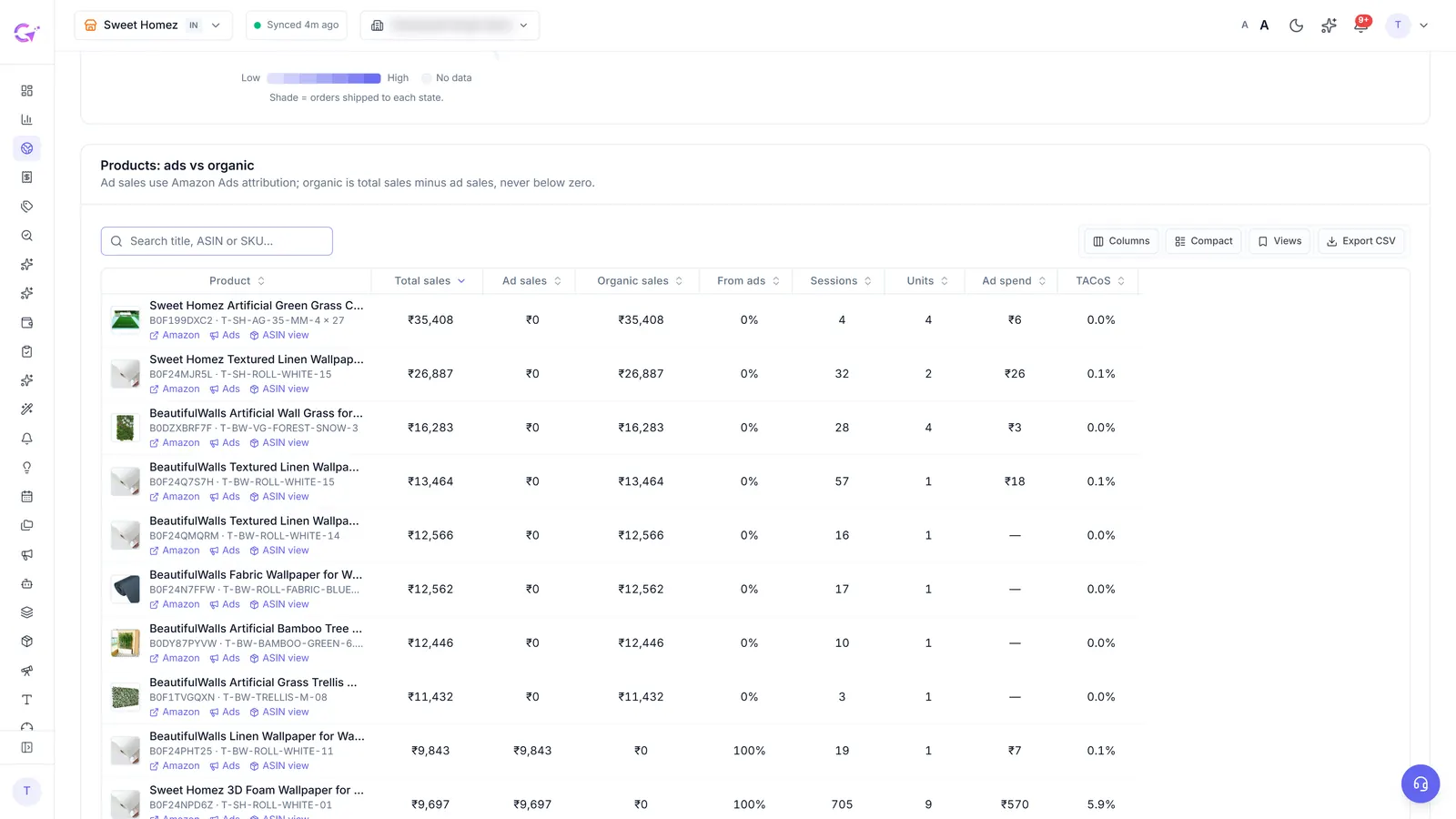
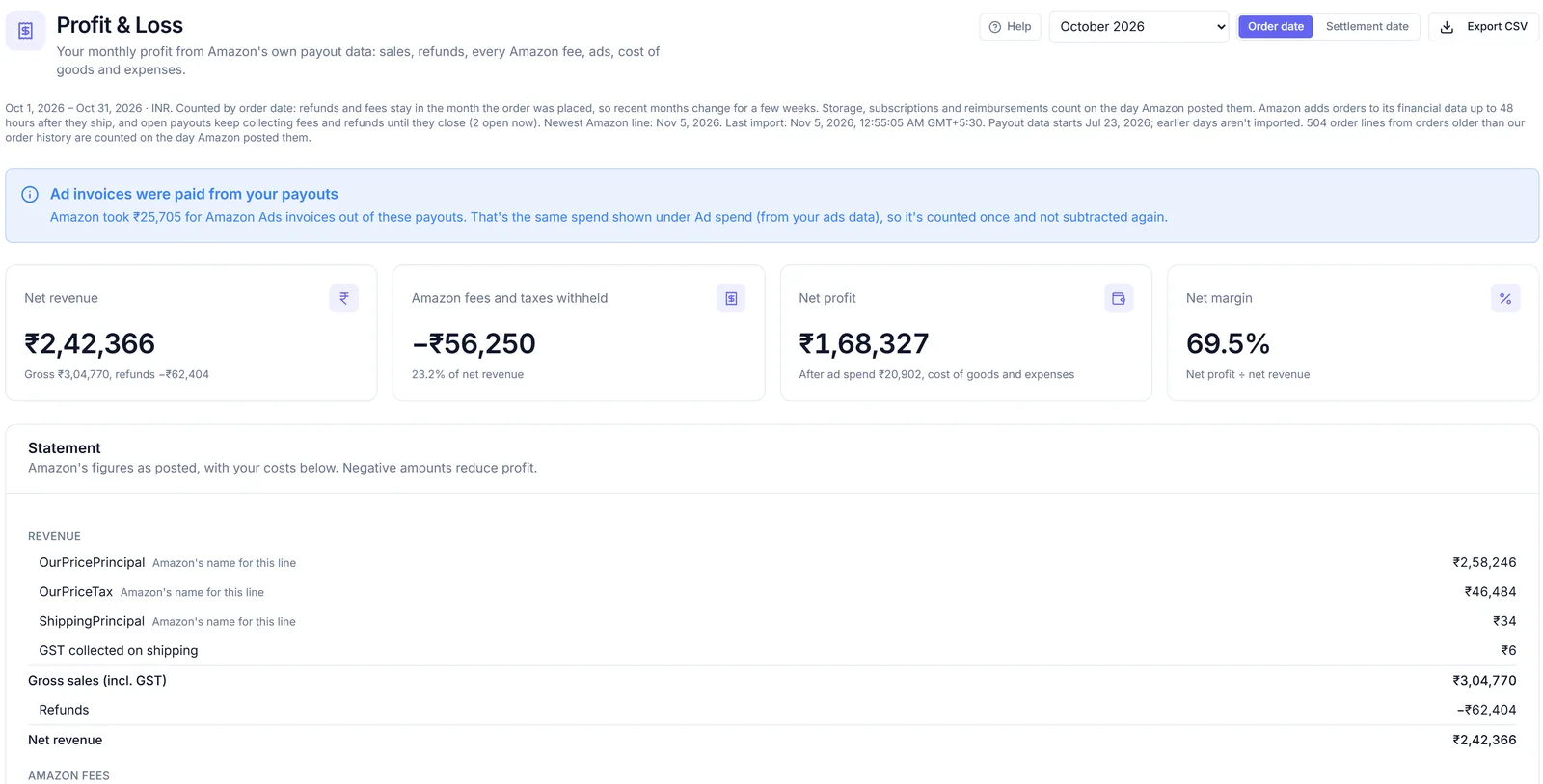
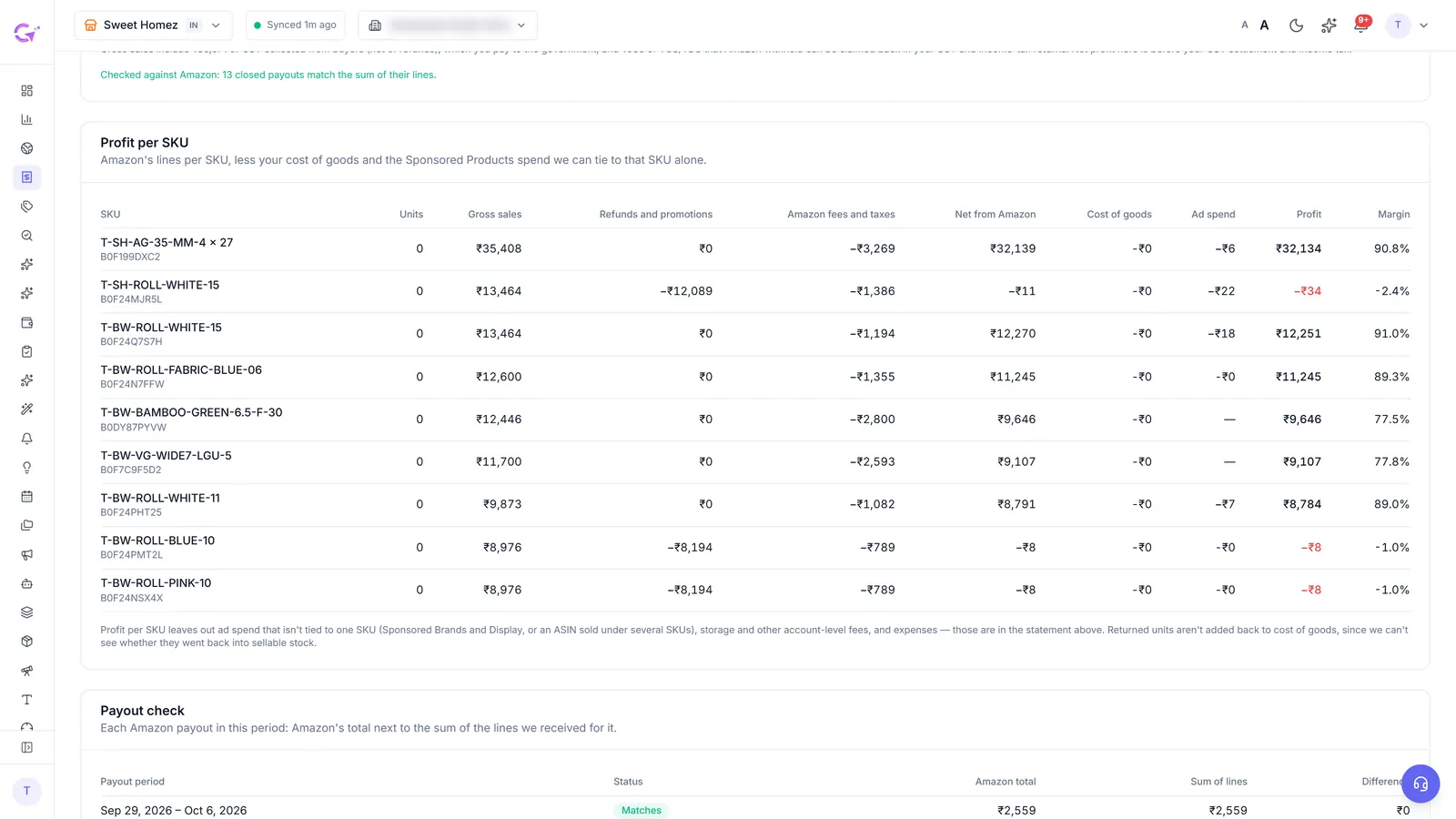
Doing the table above for 40 SKUs every month is where most people give up. With Seller Central connected, the Profit & Loss page in CreatAiGenie reads Amazon's Finances data: every fee, refund and payout, plus TCS and TDS in India. You add cost of goods per SKU once, typed or uploaded as a CSV, with effective dates for when costs change.
Feed a profit-based target into Suggestions
From the same data, Profit & Loss works out a break-even ACoS for each ASIN: 1 minus the fee rate minus unit cost divided by price. You set a margin goal, and each ASIN's target is its break-even minus that goal. Turn on the switch and Suggestions works to those per-ASIN targets instead of one ACoS number for the whole account.
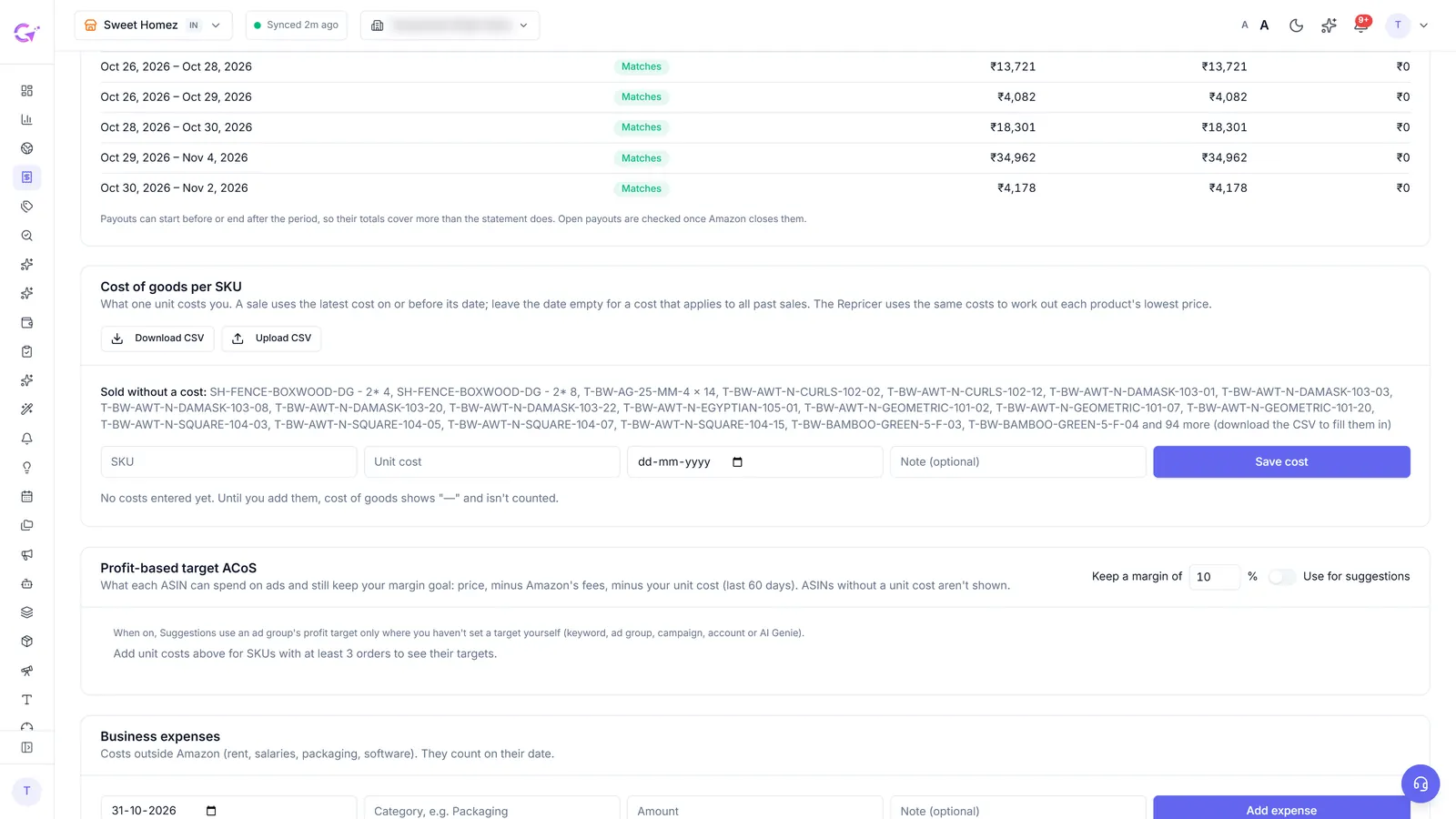
Each suggestion still shows what it found and why before you apply it, and every applied change goes into the Change Log with its 7-day result and a roll back.
Questions people ask
What is a good ACoS on Amazon?
There is no single number. A good ACoS sits below your break-even ACoS by the margin you want to keep, and that differs by product. 35% can be profitable on a high-margin product and a loss on a thin one.
Should break-even ACoS account for GST or VAT?
Yes. Treat the tax inside the price as a cost, keep the price on the same basis as the sales in your ads report, and subtract tax along with fees and cost of goods.
What is the difference between ACoS and TACoS?
ACoS divides ad spend by ad sales. TACoS divides ad spend by total sales, organic included, so it shows whether ads are growing the business as a whole.
Does CreatAiGenie calculate break-even ACoS for me?
Yes, with Seller Central connected on Platinum or during the trial. Profit & Loss works out break-even per ASIN from your fees and unit cost, and a switch feeds the resulting targets into Suggestions.
Check it in your own account
See pricing · Get a free PPC audit · Start a 14-day free trial