Blog / Myths and disputes
Are Amazon auto campaigns a waste of money? The myth, checked
"Turn off your auto campaigns, they just burn money." If you sell on Amazon, someone has told you this. Auto campaigns on Amazon do burn money when they're left alone. That's a different claim, and the difference decides what you should do.
Updated 2026-11-26
The short answer
No. Auto campaigns on Amazon are a discovery tool, and Amazon itself recommends running them alongside manual campaigns. They waste money when they run on one default bid across all four targeting groups, never get negatives, and their winning search terms are never moved to manual exact keywords. Fix those three things before you switch one off.
Where the myth comes from
The complaint is usually true as far as it goes. A seller opens the search term report for an auto campaign and finds clicks on searches that have nothing to do with the product: other brands, wrong sizes, accessories for something else. They add up the spend, see no orders, and decide auto targeting is the problem.
Look at how that campaign was set up, though. Often it was created once with the default settings, given one bid, and then left for months. No negatives, no separate bids, nobody reading its search terms. A manual broad match campaign treated that way would look just as bad. If your ads spend and nothing sells at all, that's a different problem, covered in Amazon ads spending but no sales.
What auto campaigns are for, in Amazon's own words
In an auto campaign you don't choose keywords. Amazon reads your listing and matches your ad to searches and product pages it thinks are related. It splits that matching into four groups, according to the Amazon Ads targeting guide (read 26 November 2026):
| Targeting group | Who sees your ad | What to expect |
|---|---|---|
| Close match | Shoppers searching terms closely related to your product | Usually the most relevant traffic |
| Loose match | Shoppers searching terms loosely related to your product | Wider reach, more irrelevant searches |
| Substitutes | Shoppers viewing detail pages of products similar to yours | Competitor pages; depends on your price and reviews |
| Complements | Shoppers viewing pages of products that go with yours | Can sell add-ons, often slow to convert |
Group definitions from Amazon's Sponsored Products targeting guide. The last column is our reading, not Amazon's data; your own report decides.
“advertisers often find success running both.”
Amazon Ads, A guide to targeting with Sponsored Products, read 2026-11-26
"Both" means auto and manual. The same guide suggests starting with an auto campaign, letting it run for about two weeks, and then using its search term report to build manual campaigns. In other words, Amazon describes auto as the place where you find keywords, not the place where you keep spending on them forever.
The three setup mistakes that make auto campaigns waste money
- One bid for all four groups. Amazon lets you set a single default bid or a bid per targeting group. With one bid, loose match and complements get the same price per click as close match, even when they convert far less. Set a bid per group and lower the groups that don't earn their clicks.
- No negatives. Amazon's guide says negative keyword and negative product targeting work in automatic campaigns too. A search that has taken about twice your usual clicks per order with no sale is unlikely to be bad luck. Add it as a negative exact. How to find and block wasted search terms walks through the threshold.
- No harvesting. When an auto search term sells well, add it as an exact keyword in a manual campaign so you control its bid. Then add the same term as a negative exact in the auto campaign, or the two campaigns compete for the same shopper and you can't tell which one earned the sale.
When switching auto off is the right call
The myth isn't always wrong. There are cases where an auto campaign earns little and a small budget is better spent elsewhere:
- Your product has a short list of searches everyone already knows, and your manual exact campaigns cover them. After a few rounds of harvesting, the auto campaign stops finding anything new.
- Your budget runs out by midday. Discovery is the first thing to cut when there isn't enough money for the keywords that already sell.
- The listing is the problem. With few reviews, a weak main image or a higher price than nearby products, substitutes and complements will lose on detail pages whatever the bid. Fix the listing before blaming the targeting.
Even then, pausing beats deleting. A paused auto campaign keeps its history, and you can turn it back on for a sale period or a new variation. Note also that Amazon doesn't let you change a campaign from auto to manual targeting once it's live, so you build a new campaign either way.
A weekly routine for auto campaigns
- Open the targeting tab of the auto campaign and compare the four groups on spend, orders and ACoS for the last 30 days. Lower the bid on any group running above your break-even ACoS.
- Download the search term report for the same campaign. Filter to zero orders and clicks above your threshold. Negate the irrelevant ones as negative exact.
- Filter to two or more orders at an ACoS under target. Add those as exact keywords in a manual campaign, and as negative exact in the auto campaign.
- Check product targets the same way: ASINs that take clicks and never convert become negative product targets.
- Write down what you changed and why, so next week you can see whether it worked.
Not sure whether your own auto campaigns are the problem? Run the free PPC audit and see where your ad money goes before you switch anything off.
Doing it in CreatAiGenie
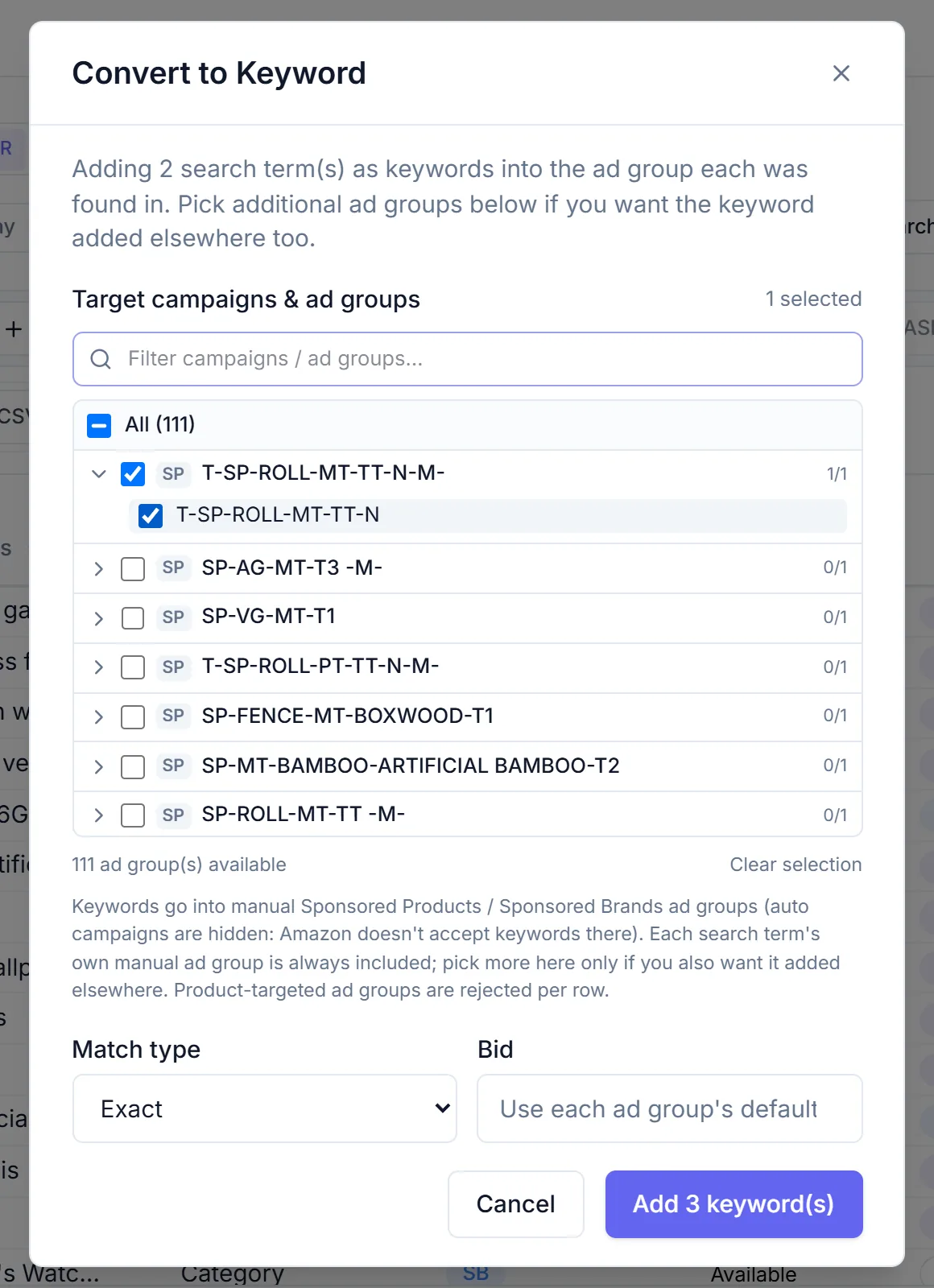
In Search Terms, filter to auto campaigns, tick the terms that sell, and convert them to keywords in bulk. Auto campaigns are skipped as destinations, because Amazon doesn't accept keywords there, so each term goes to the manual ad group you pick.
Suggestions lists Auto to manual moves and bid changes for auto-targeting groups each day, with the clicks, spend and reason. If you'd rather it ran on a schedule, AI Genie has a module for exactly this, Smart Negative Targets for auto campaigns, which never negates your own ASINs. Dry run is on by default, so you see what it would do before anything reaches Amazon.
Every change is logged in the Change Log with the reason and a Roll back button. If a negative blocks a search you needed, undo it from the Change Log. More on why that matters in how to check and undo PPC changes. You can try all of it free for 14 days, on a flat monthly price that's never a percentage of your ad spend.
Questions people ask
Should I run auto campaigns on Amazon?
For most products, yes, alongside manual campaigns. Use auto to find searches and product pages you hadn't thought of, then move the ones that sell into manual exact keywords.
How long should an Amazon auto campaign run before I judge it?
Amazon suggests about two weeks before building manual campaigns from it. For low-traffic products, wait until terms have enough clicks to judge against your usual clicks per order.
Can you add negative keywords to an auto campaign?
Yes. Amazon allows negative keywords and negative product targets in automatic campaigns. Negative exact is the safe default.
Can I set different bids for close match and loose match?
Yes. An auto campaign can use one default bid or a separate bid for each of the four targeting groups: close match, loose match, substitutes and complements.
Can I change an auto campaign to manual?
No. Amazon doesn't let you change the targeting type once a campaign is live. Create a manual campaign and move the keywords that sell into it.
Check it in your own account
See pricing · Get a free PPC audit · Start a 14-day free trial